
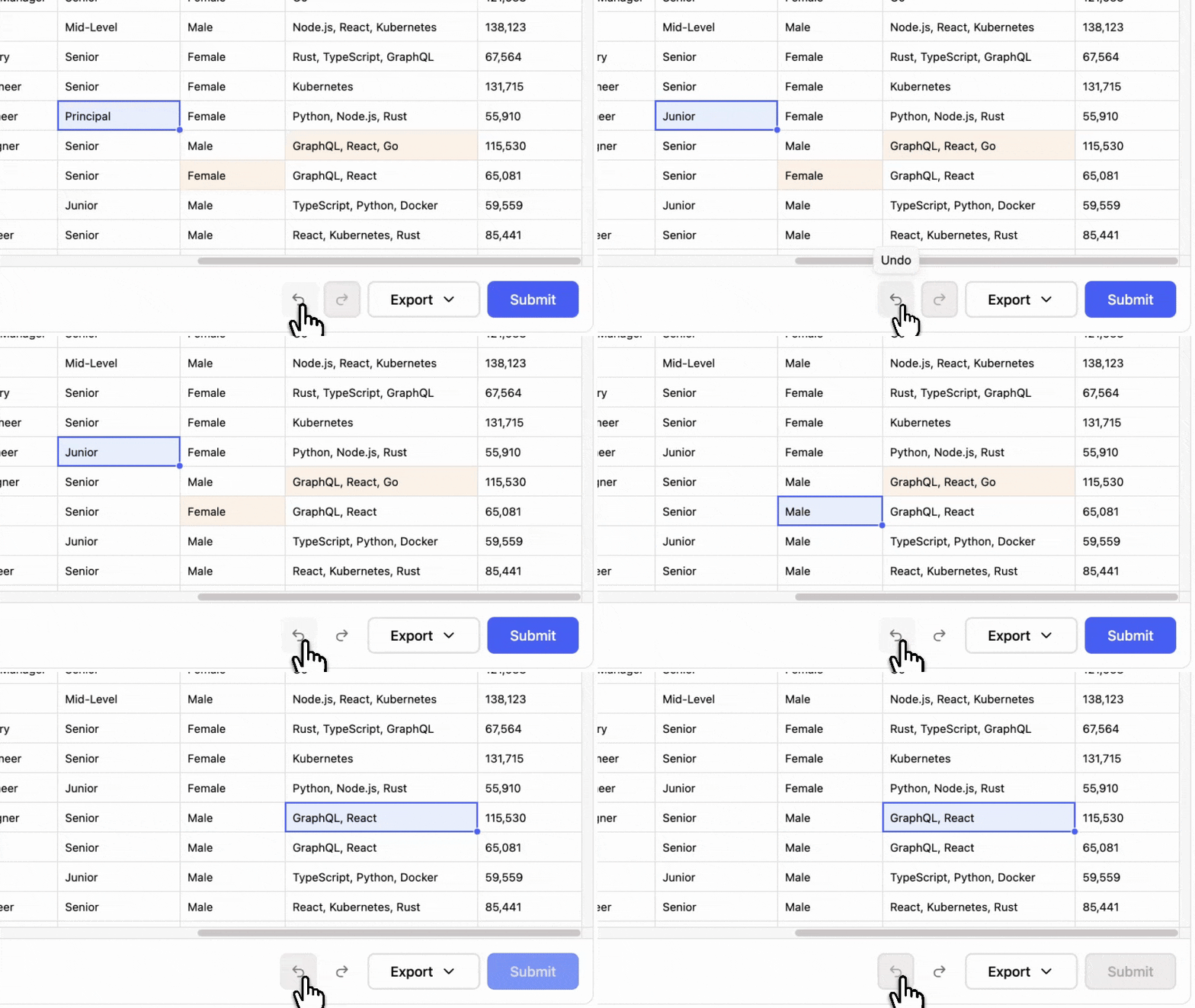
Undo and redo
Every edit, fill, paste, and delete steps back, for the whole session.
Add CSV, Excel, JSON, and XML import to a Svelte or SvelteKit app with one custom element and a column schema. No compiler configuration, and files never reach Updog's servers.
Free up to 100,000 rows a month. Team is $100 per domain.
The rest is configured with props, and every one of them is typed.
<script lang="ts">  import "@updog/data-editor-wc";  import "@updog/data-editor-wc/styles.css";  import type { DataEditorColumn, UpdogEditorElement } from "@updog/data-editor-wc";
  const columns: DataEditorColumn[] = [    { id: "name", title: "Name" },    {      id: "email",      title: "Email",      validators: [{ type: "email" }, { type: "unique" }],    },  ];
  let editorEl: UpdogEditorElement | undefined = $state();
  $effect(() => {    if (!editorEl) return;    const el = editorEl;    el.configure({      apiKey: "YOUR_KEY",      columns,      primaryKey: "email",      onComplete: (result) => save(result.sources),    });    const onClose = () => el.hide();    el.addEventListener("close", onClose);    return () => el.removeEventListener("close", onClose);  });
  function open() {    editorEl?.show();  }</script>
<button type="button" onclick={open}>Open Importer</button><updog-editor bind:this={editorEl}></updog-editor>
Version 0.1.105Published October 2026Web ComponentNo setup required
Five steps. Someone who has never seen your product finishes them without instructions.
The person drops one file or several at once. An Excel workbook comes apart into one card per sheet, and empty sheets arrive unchecked.
Click to upload or drag and drop
Headers are matched against your schema by fuzzy matching and a synonym list you can extend. First Name, fname, and Contact First all land on firstName, and anything left over waits for the person.
A column with a fixed list of options gets a second pass over the values. Active, active, ACTIVE, and Currently active become one value from your list.
The primary key decides what happens when the same record arrives twice. Rows that already exist are updated in place, which makes a second import of a corrected file safe.
Every row becomes a new entry, even if it repeats one you already have.
The last step opens the full editor with the imported rows in it. Failed rules are marked on the cell with the message you wrote, and the person fixes them before anything reaches you.
Imported rows land in a full editor with undo, a fill handle and find and replace.
Every edit, fill, paste, and delete steps back, for the whole session.
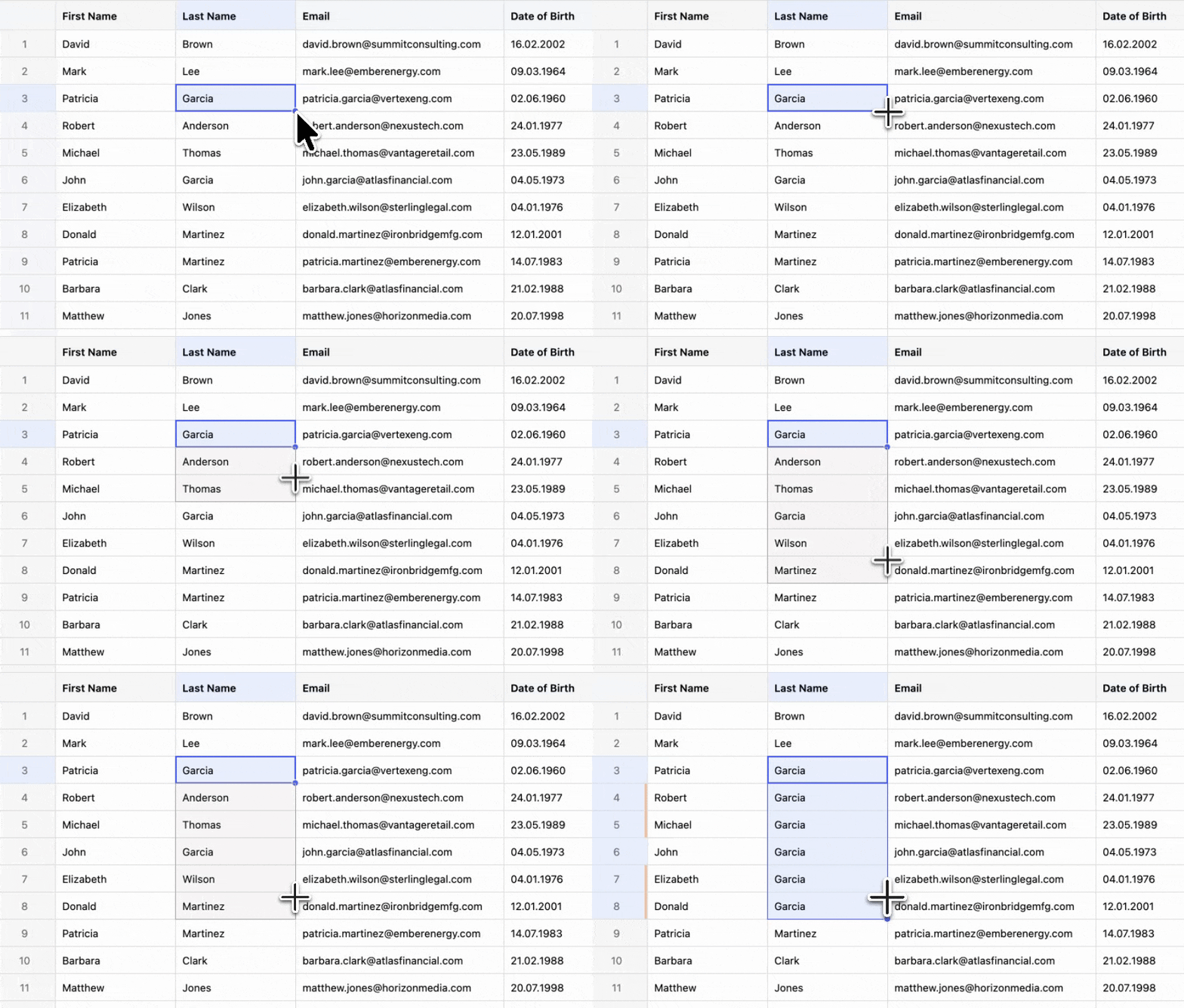
Drag the corner of a cell to copy the value down the column.
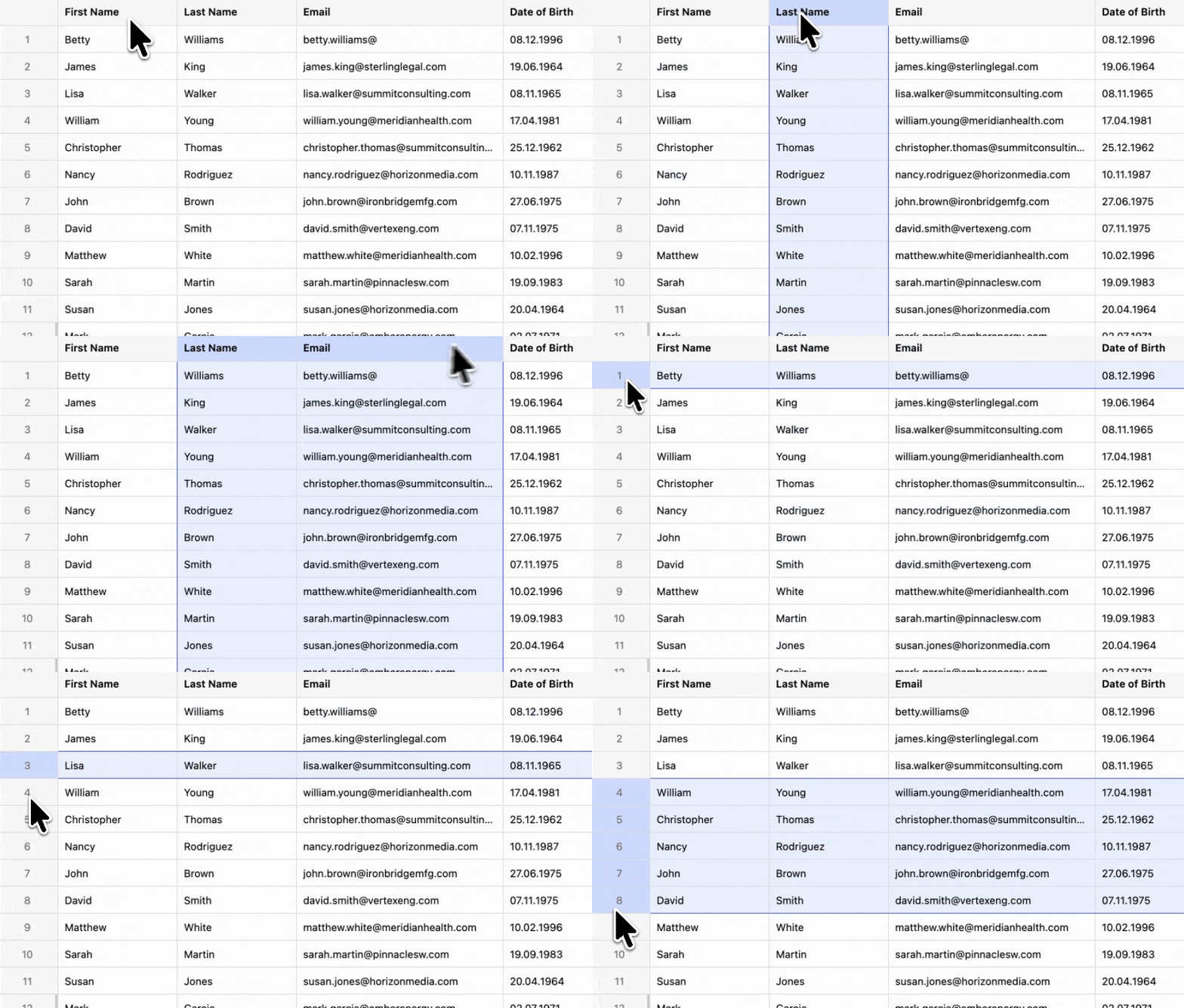
Click the header to take the column, or the row number to take the row.
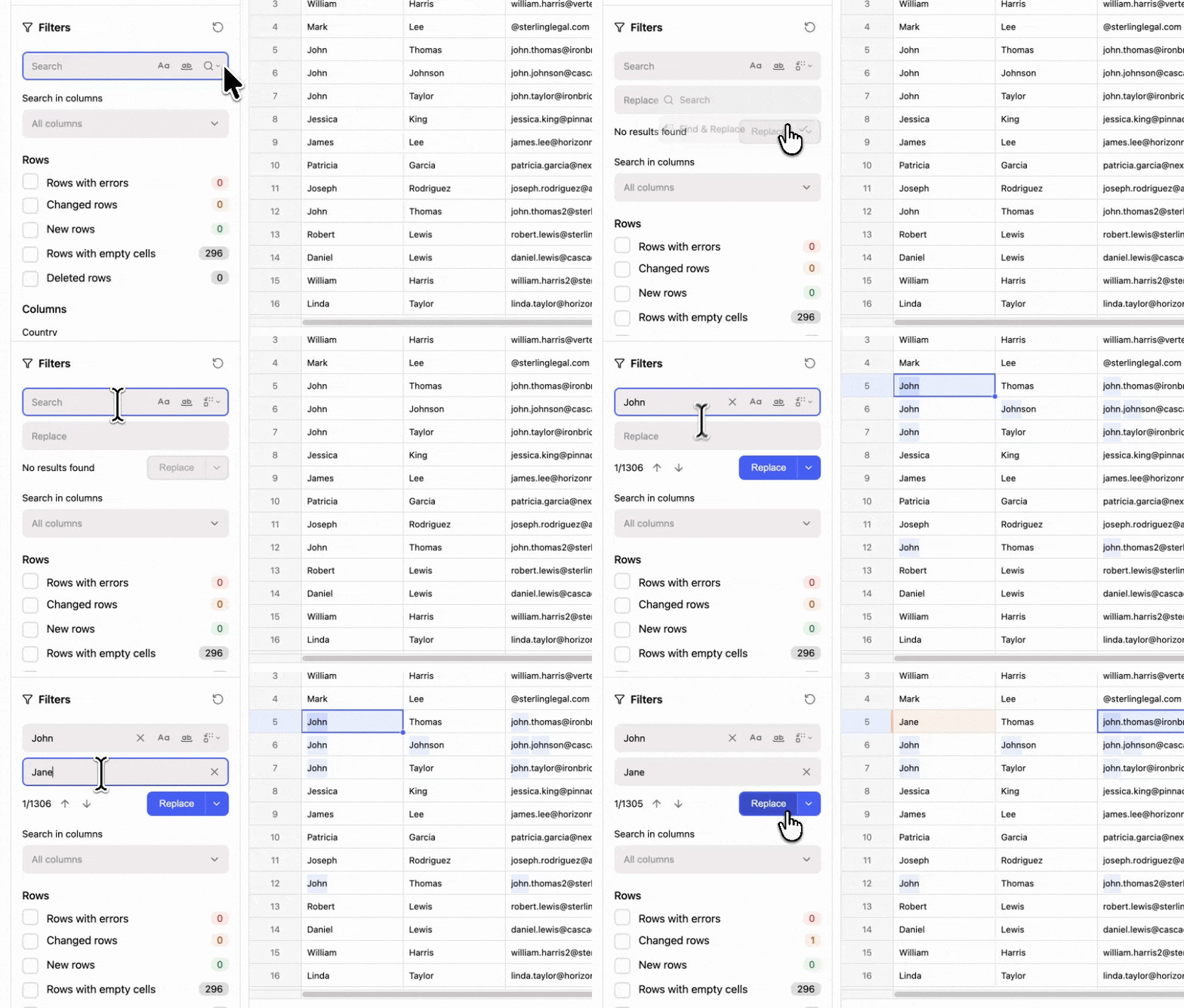
Search the whole file or one column, then replace every match at once.
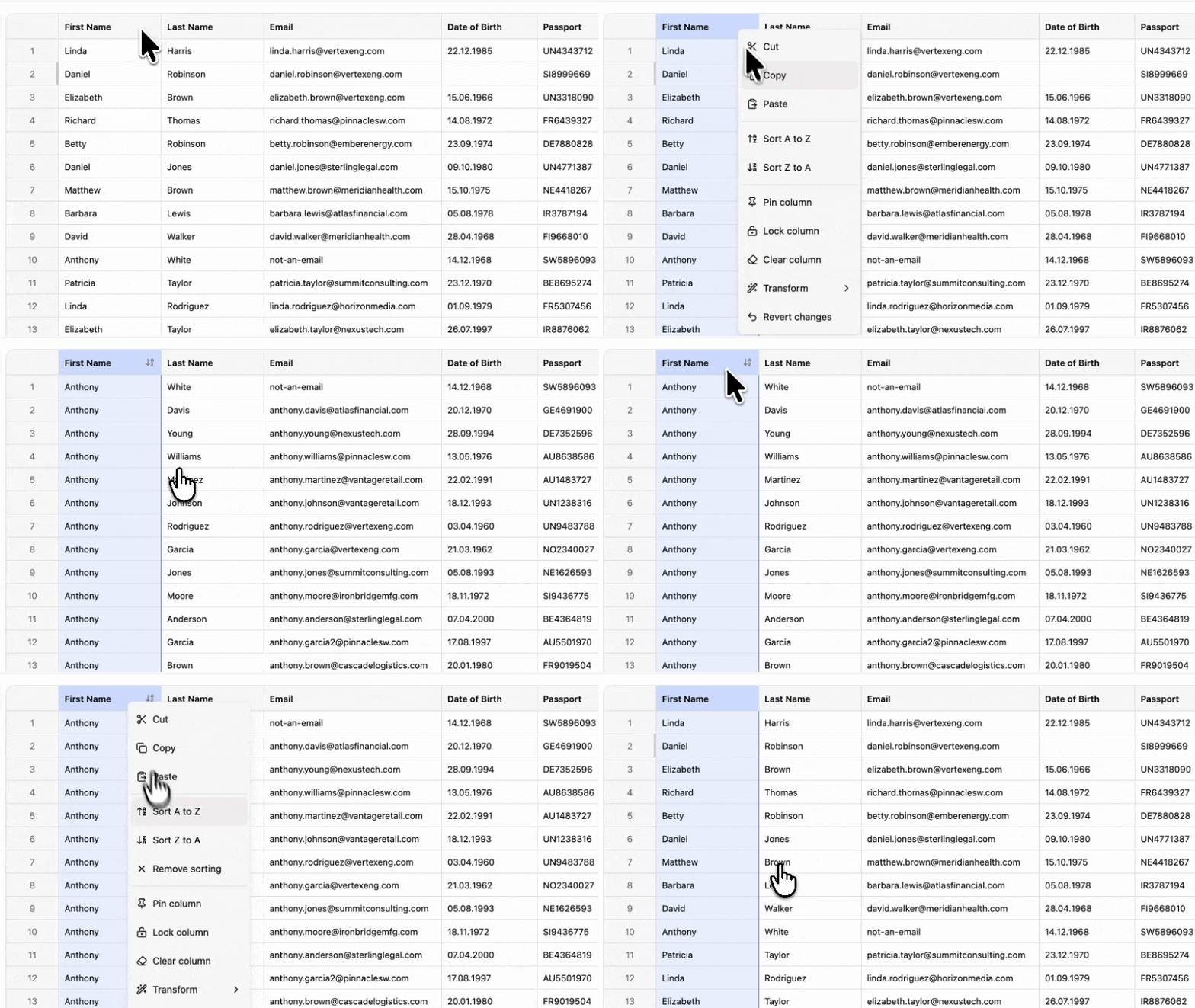
Sort by any column, and narrow the file by text, number range, or date range.
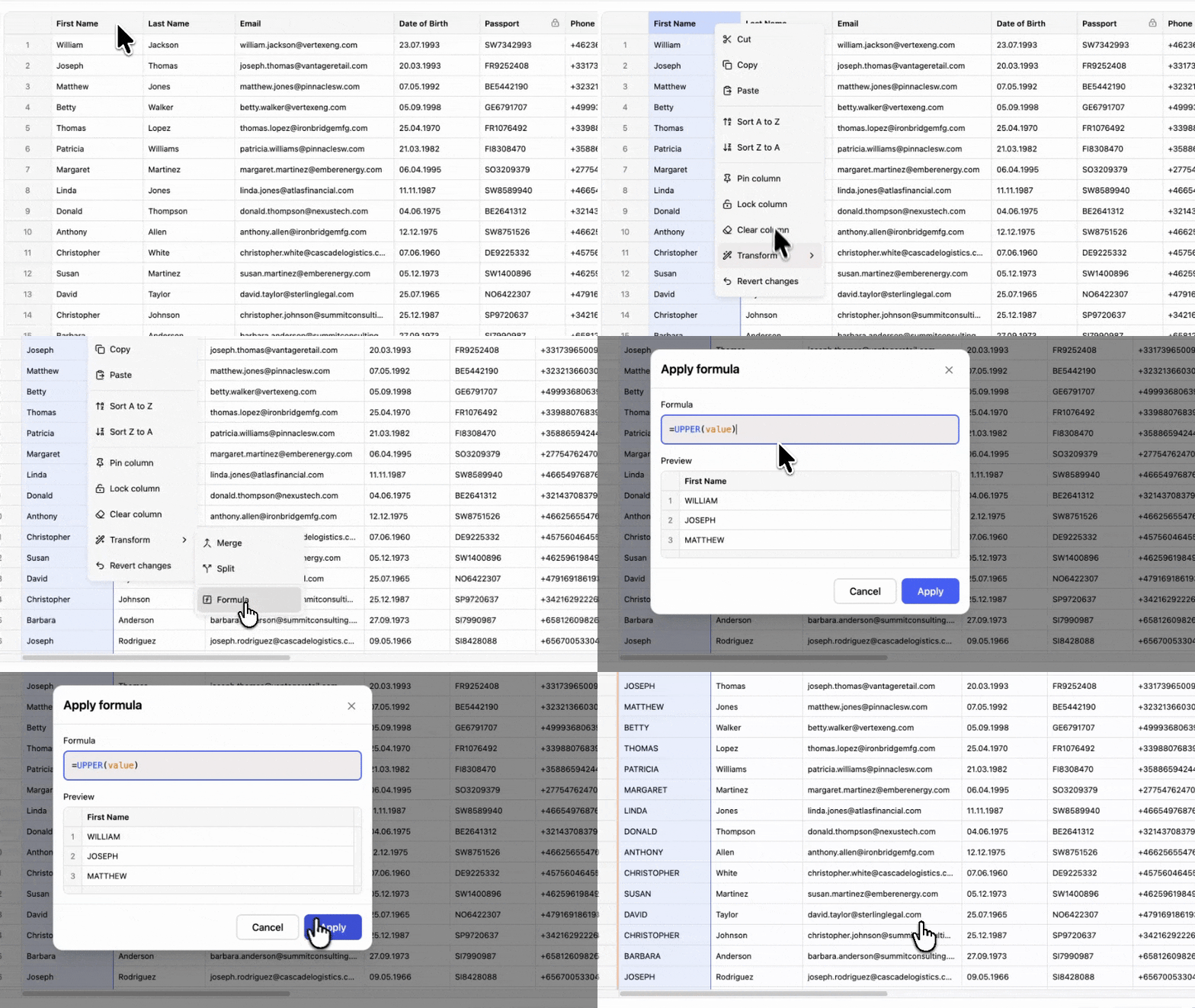
Trim, split, merge, or change the case of a whole column in one pass.
Every customer file brings edge cases. Updog handles them for you.
A title line, a blank row, and an export timestamp above the real header. The header is found without help.
Semicolons, tabs, and pipes are detected from the file rather than assumed, which is what most European exports produce.
Text that arrives as mojibake is decoded before parsing, so names in Cyrillic, Japanese, or Chinese survive the trip.
A column holding 03/04/2024, 2024-04-03, and 3 Apr 2024 is read as dates, with day before month settled once for the whole file.
A currency symbol, a thousands separator, or a comma for the decimal point still becomes a number your app can store.
Those cells are marked and counted, the import carries on, and the person fixes them in the grid before you see the rows.
Old and non-Excel spreadsheets are read as well, including .xls, .xlsb, and .ods files.
Bundle size, rendering, theming, licences, and where the data goes.
HTMLElement is not defined.No per-import fee and no price per seat.
Free covers 100,000 rows a month. Team has no row limit, and one extra domain, for staging, is free.
Get an API keyNo. It ships as a Web Component. @updog/data-editor-wc registers <updog-editor> as a standard custom element, and inside it runs the same React implementation the React package uses. That is why the element behaves identically in Angular, Vue, Svelte, and plain JavaScript, and why the API is one configure() call rather than framework-specific bindings.
None. Svelte passes unknown tags straight through to the DOM, so importing the package and rendering <updog-editor> is enough. In SvelteKit, keep the import in client code because the element is browser only.
Through configure(). Simple values like api-key, primary-key, variant, and locale can be written as HTML attributes, but columns, loadData, translations, and every callback go through editor.configure(). A callback written as a template binding silently does nothing in Vue and Svelte, and fails the build in Angular.
Yes, on the client. A top-level import returns 500 from the dev server with ReferenceError: HTMLElement is not defined, because the element registers itself against the browser DOM. The production build survives, so this breaks in development only. Import the package inside the click handler and render the element once it resolves. Setting export const ssr = false in the page also works, but it costs you server rendering for the whole page.
About 459 KB, brotli, since the element carries its own copy of React. An importer opens on a click, so move the import into the click handler and it arrives then, not on first load.
Yes. CSV, TSV, Excel, JSON, and XML import, and the Excel reader also handles .xls, .xlsb, and .ods files. An Excel workbook is split into one importable sheet per tab. For PDFs, scans, or other formats, you register your own parser and Updog imports the rows it returns.
Install the package, describe the columns in an array and mount the element with a result handler, as in the snippet on this page. An AI assistant like Claude Code does this in under five minutes from the agents page in the docs. From there the importer parses, maps, validates and edits files without further code. You write the validators your schema needs and the handler that sends the rows to your API.
In the browser. Imported row data never reaches Updog's servers, and Updog has no server-processing mode. The only request that leaves the page is a licence check carrying your API key.
About 1 million rows at roughly 20 columns in the browser, limited by the user's machine memory. That is a practical ceiling rather than a promise, and a wide table with long text reaches it sooner than a narrow one.
No. Everything runs in the browser, and a file that does not fit in memory needs a server-side pipeline instead.
No. The package runs entirely in your users' browsers, so there is nothing to host, and the licence check is the only piece that depends on us.
No. Neither one applies to imported row data, because that data never reaches our servers and we never process it. If your procurement process requires a certificate covering the import vendor regardless, a hosted importer is the honest answer.
Yes. Pass loadData and the grid opens on rows from your backend, with import switched off if you want. Read-only mode is supported as well.
Free up to 100,000 rows a month, with every feature included.