






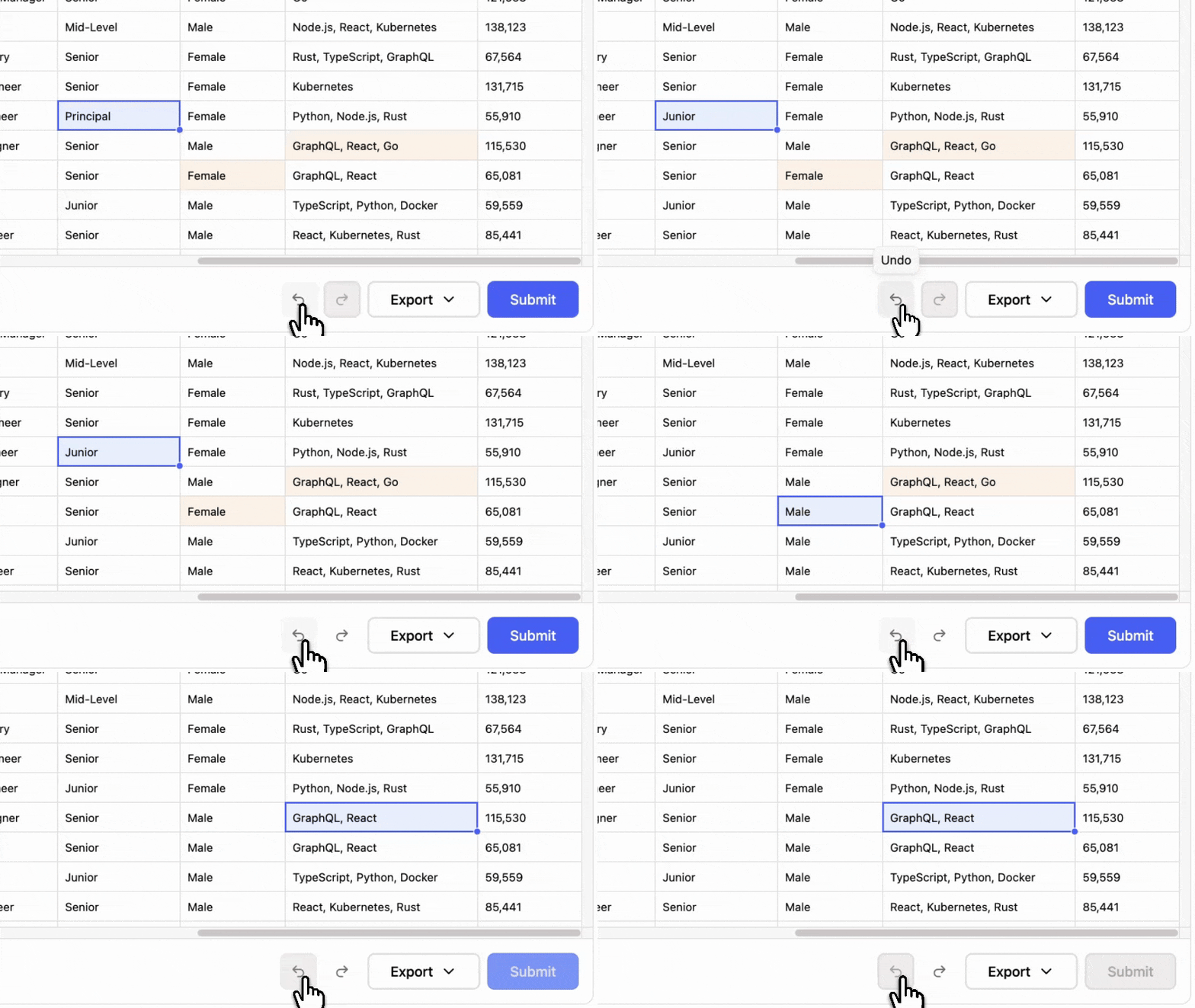
Undo and redo
Every edit, fill, paste, and delete steps back, for the whole session.
Add a complete import flow to your app. Users map columns, fix errors, and submit clean data. Everything runs in their browser.
100% client-sideWhite-labelFlat $19/domain/month
A complete import flow that turns your users’ files into clean data for your app.
Reads the files, matches columns to your schema, validates every row and lets users fix what fails.
Clean rows arrive in your handler. Your app saves them to your database, your API or wherever they belong.
Every screen between a dropped file and clean rows in your app.
Click to upload or drag and drop
Every row becomes a new entry, even if it repeats one you already have.
{
  "sources": [
    {
      "sourceId": "upload",
      "sourceName": "people-may-2026.csv",
      "rows": [
        {
          "row": { "id": 4, "email": "[email protected]" },
          "isNew": false,
          "isChanged": true,
          "isDeleted": false,
          "isValid": true
        }
      ]
    }
  ],
  "counts": { "new": 4, "changed": 2, "deleted": 1, "invalid": 0 }
}Every customer file brings edge cases. Updog handles them for you.
A title line, a blank row, and an export timestamp above the real header. The header is found without help.
Semicolons, tabs, and pipes are detected from the file rather than assumed, which is what most European exports produce.
Text that arrives as mojibake is decoded before parsing, so names in Cyrillic, Japanese, or Chinese survive the trip.
A column holding 03/04/2024, 2024-04-03, and 3 Apr 2024 is read as dates, with day before month settled once for the whole file.
A currency symbol, a thousands separator, or a comma for the decimal point still becomes a number your app can store.
Those cells are marked and counted, the import carries on, and the person fixes them in the grid before you see the rows.
Old and non-Excel spreadsheets are read as well, including .xls, .xlsb, and .ods files.
Add @updog/data-editor to a React app.
Every column gets an id, a title and any number of validators, from built-in rules to your own functions.
Mount <DataEditor> with the columns and an onComplete handler.
import { DataEditor, type DataEditorColumn } from "@updog/data-editor";import "@updog/data-editor/styles.css";
type Employee = { name: string; email: string };
const columns: DataEditorColumn[] = [  { id: "name", title: "Name", validators: [{ type: "required" }] },  { id: "email", title: "Email", validators: [{ type: "email" }, { type: "unique" }] },];
export function ImportEmployees() { return ( <DataEditor<Employee> apiKey="YOUR_KEY" columns={columns} primaryKey="email" onComplete={(result) => save(result.sources)} /> );}A React package, and a Web Component for every other framework.
Imported rows land in a full editor with undo, a fill handle and find and replace.
Every edit, fill, paste, and delete steps back, for the whole session.
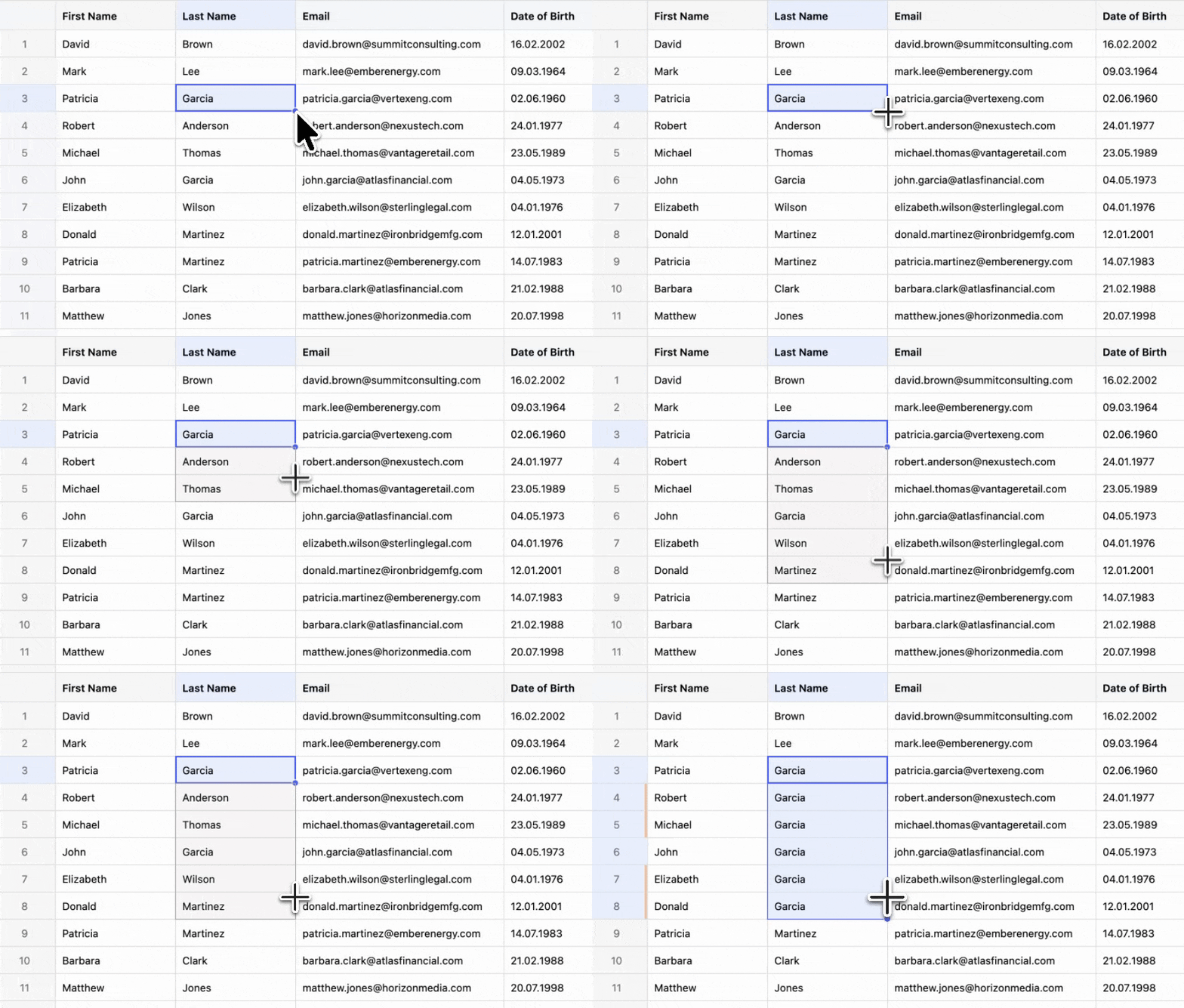
Drag the corner of a cell to copy the value down the column.
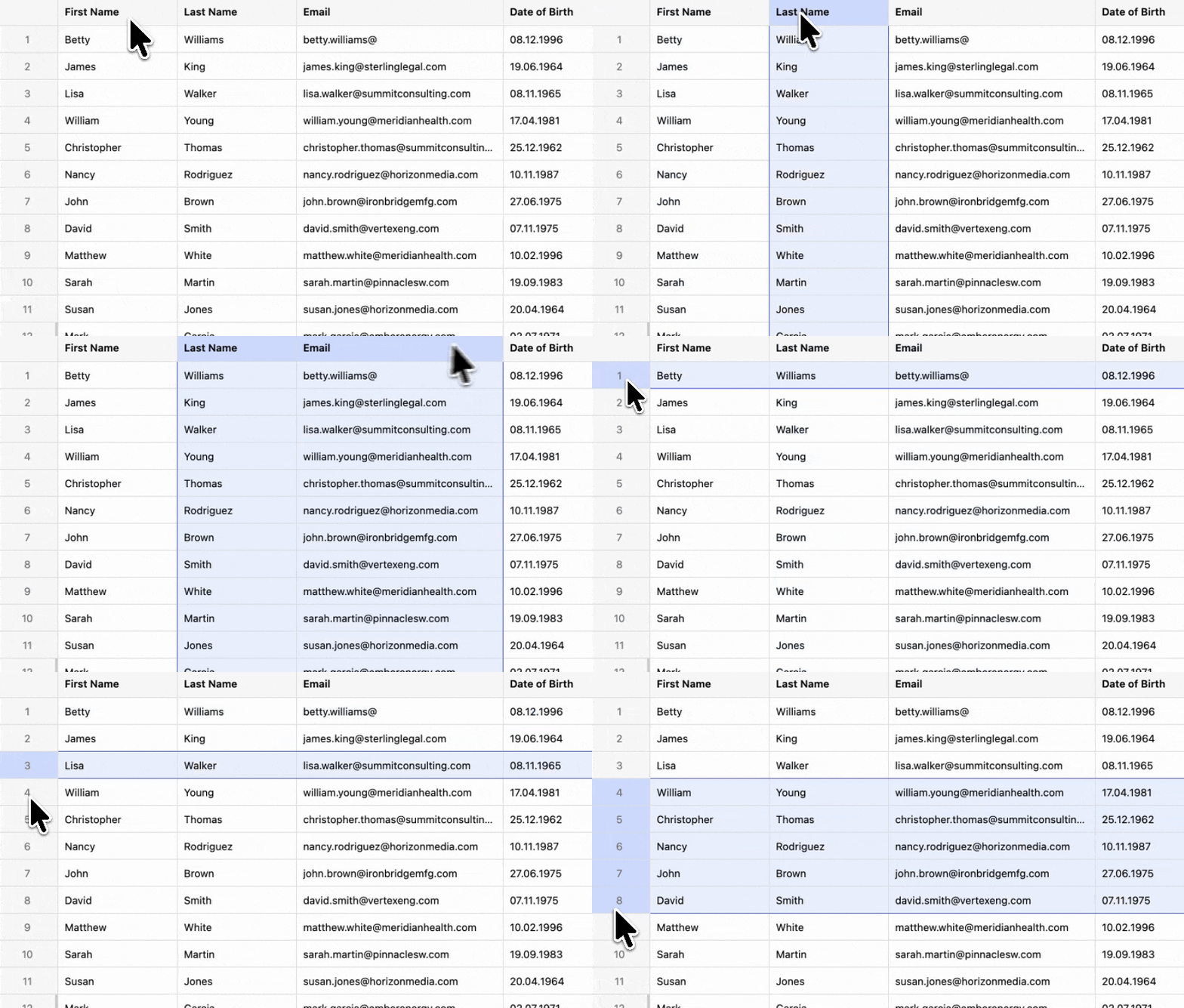
Click the header to take the column, or the row number to take the row.
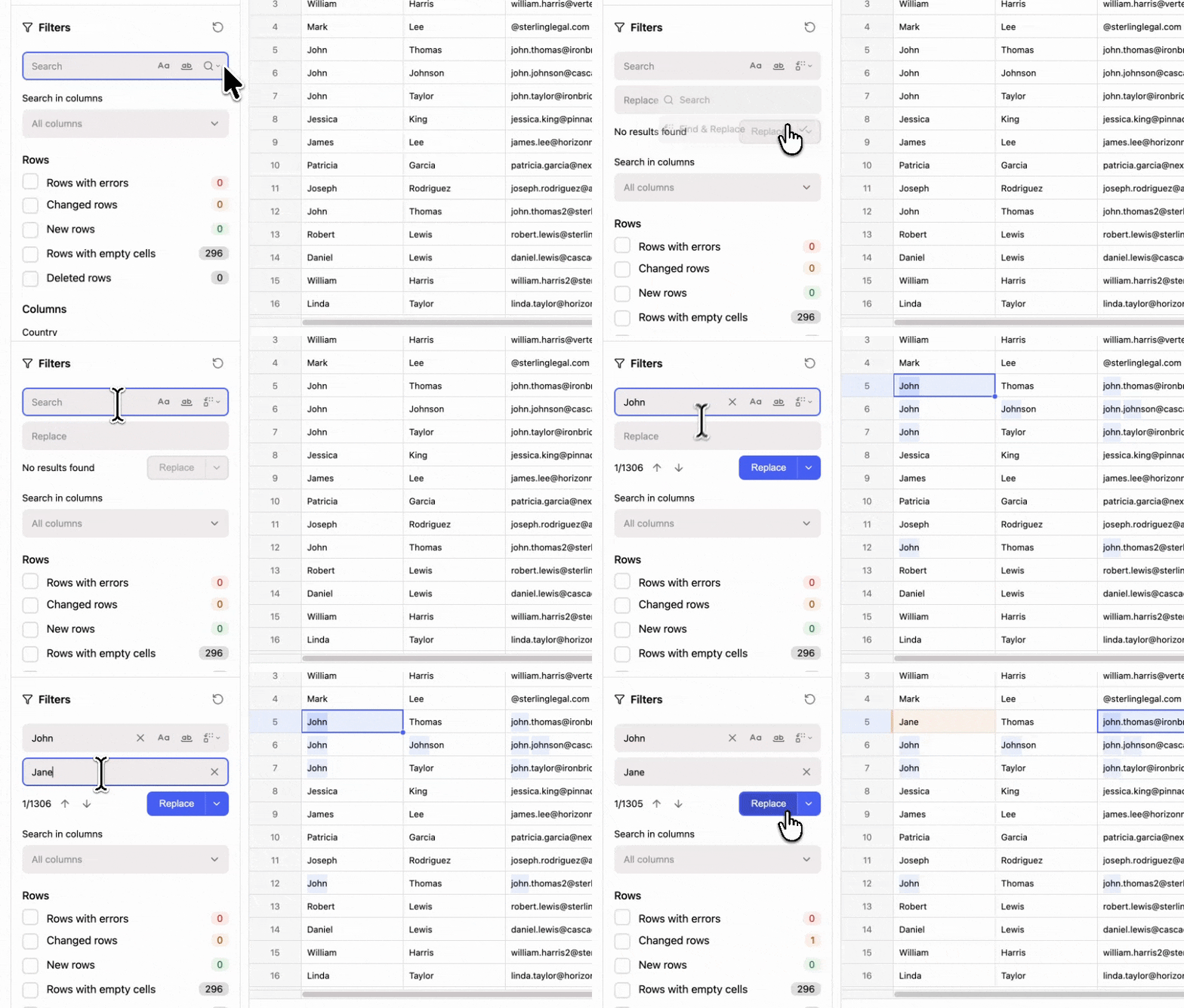
Search the whole file or one column, then replace every match at once.
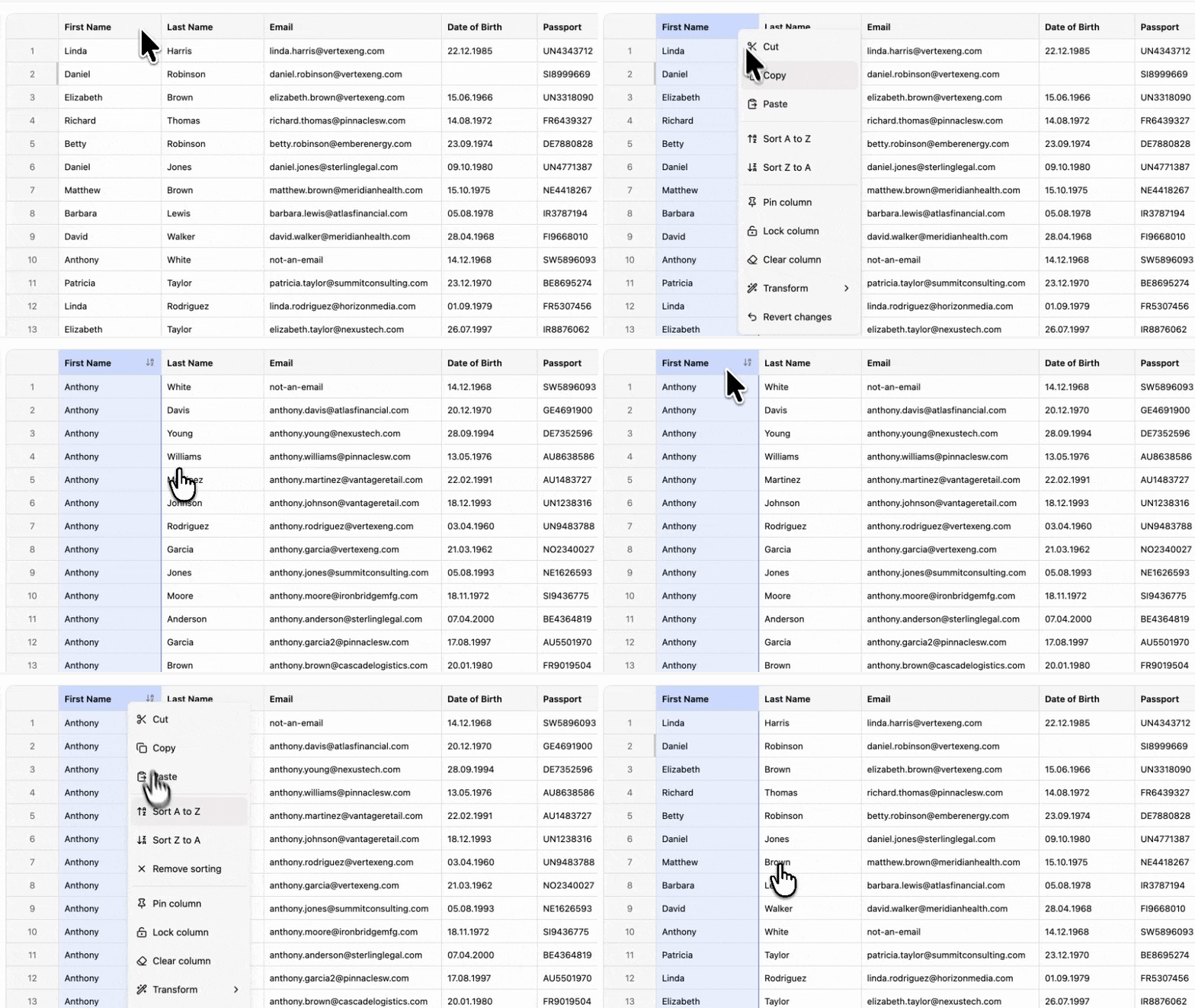
Sort by any column, and narrow the file by text, number range, or date range.
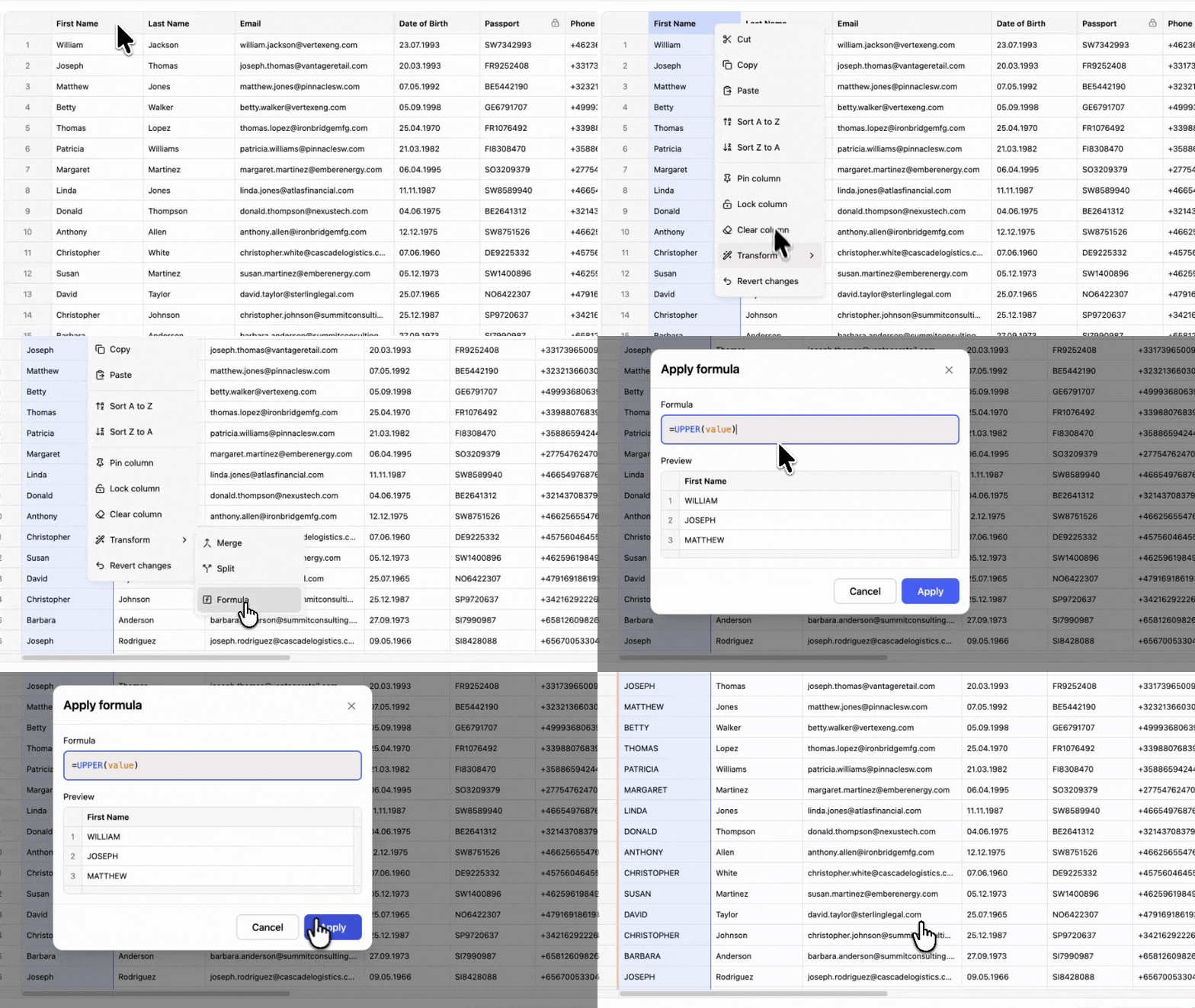
Trim, split, merge, or change the case of a whole column in one pass.
Your model, your prompt and your data. Updog Importer wires them together.
Map messy column headers and dropdown values to your schema with any AI model. Whatever the model skips falls back to built-in fuzzy matching.
An assistant that opens from the grid footer, where users describe a fix in plain language. Your model returns a transformation and Updog applies it across every row, in the browser.
Updog never makes the call. Bring your own AI means your model, your provider, your request. With every message Updog passes along the context you need to build a prompt that you send to any LLM, then you return a transformation function that Updog applies across every row, keeping the whole thing fast and private.
One unedited take on the benchmark file, 1,000,000 rows by 20 columns.
Parsing, column matching, validation, filtering, sorting, editing, undo and export run on that file inside the tab. The grid draws on canvas and only paints the rows on screen, so scrolling costs the same at row 1 and at row 1,000,000. A million rows is the practical ceiling at 20 columns. The benchmark holds 20,000,000 cells with every filter active, so fewer columns can carry 5 or 10 million rows.
The file never leaves the browser, so the answers are short.
Updog holds no SOC 2 report and no ISO 27001 certificate.
Parsing, matching, editing and validation, on the free plan and the paid one alike.
CSV, XLSX, TSV, JSON, XML. Legacy XLS, binary XLSB, and OpenDocument ODS read too. Drop a file, get structured data.
Auto-maps imported columns to your schema. Fuzzy matching, synonyms, or your own callback.
Map imported values to the options your columns expect.
Import multiple files into one grid. Each source tracked, toggled, or removed independently.
Second import? Existing rows update in place. New rows append. No duplicates.
Canvas rendering, virtual scrolling, Web Worker filtering.
Imported file has columns your schema doesn't? Users create them on the fly.
Click a cell, start typing. Tab, Enter, arrow keys. It works like a spreadsheet.
Text, email, url, phone, number, boolean, date, time, select, multiselect, country and currency.
Insert above, insert below, duplicate, delete.
Cells, ranges, rows. Paste from Excel or Google Sheets.
Drag to fill. Source values repeat across the target range.
Everything runs in the browser. No backend, no data leaves the user's machine.
Every edit, paste, transform, and delete goes on the stack. Full command history.
Search across all cells. Case-sensitive, exact match, column-scoped. Replace one or all.
Ascending, descending, or clear. Stable sort, locale-aware.
Select lists, number ranges, date ranges. Define per column, users control from the sidebar.
Split, merge, trim, and more. Bulk operations across a million rows.
Spreadsheet-style expressions on columns. Concat, split, substring, substitute. Everything recomputes live as data changes.
Clean messy data with a prompt. Split names, normalize dates, fix casing. Your model, your prompt, your data.
Required, unique, type checks. Errors surface inline, and users fix them in place.
Write your own validation function per column.
Declare dependent fields. When one cell changes, related cells re-validate automatically.
Show "$1,000" in the cell. Store "1000" underneath. Formatters are display-only.
Normalize on entry. Trim whitespace, parse numbers, format dates, all before they hit the store.
CSV, XLSX, TSV, JSON, XML. Validated and formatted. Ready for your pipeline.
Match your brand colors, fonts, and design system. Every Updog plan includes full white labeling at no extra cost.
Native React component. Web Component wrapper for Vue, Angular, Svelte, or plain HTML.
Pin columns so identifiers stay visible while users scroll horizontally.
Shadow table for screen readers. ARIA roles, live regions, full keyboard navigation.
Override every string. Right-to-left layout where the locale demands it.
One prop. The grid becomes view-only. No editing, no deletion, no import.
Predictable from your first import to your millionth, with no per-import fees.
Free
$19/domain/month
No card needed
Everything you need to know about Updog.
Yes. Parsing, validation, transformation, and editing all run in the browser. Your users' data never leaves their machine. No server, no data residency, no third-party processing.
Yes. Updog's 1M-row benchmark covers the full client-side import workflow: parsing, column mapping, validation, filtering, sorting, editing, undo/redo, transformations, and export. In our 1,000,000-row by 20-column benchmark, Updog uses around 800MB on the main thread, plus about 350MB in a Web Worker for the full working set.
React as a first-class component. For Vue, Svelte, Angular, or any other framework, a Web Component that works anywhere.
CSV, TSV, XLSX, legacy XLS, binary XLSB, OpenDocument ODS, JSON and XML. Users can also paste from Google Sheets or Excel and merge several files into one import. A PDF, a scan or any other format goes to a parser you register, and Updog imports the rows it returns.
Both. Take a messy file and clean it up. Or start with data you already have. Users get undo/redo, find & replace, copy/paste, fill handle, and built-in transformation functions.
Yes. Copy, cut, and paste, including from spreadsheets your users already use. Select a cell, a range, a full row or column, or hold Cmd/Ctrl to pick non-adjacent cells. Keyboard navigation and the fill handle work the way people expect. If they have used a spreadsheet before, they already know this one.
$0 on localhost and preview domains, the ones Vercel, Netlify, Lovable, Bolt, Base44, StackBlitz, and ngrok hand out. $19 per production domain per month, and your first paid domain covers two. Each domain after that is $19/mo. Subdomains count as their own domains. Every plan includes every feature. No per-row fees, no per-import fees, no usage caps.
There is no Powered by badge and no Updog logo, on any plan including the free one. Every visual element is yours to change through CSS variables and class overrides, from colors and fonts to spacing and borders, and every string of text can be replaced with your own.
You own the prompt. Choose any LLM provider, write a prompt that returns a transformation function. That function is applied against the data locally, in the browser.
Imported row data does not transit or get stored on Updog infrastructure. Parsing, mapping, validation and editing run in the browser, and the one request the SDK makes is a license check that carries no file contents, so no data processor relationship arises over your users' files. Updog Software Solutions FZCO holds no SOC 2 report and no ISO 27001 certificate. Where procurement requires a certificate covering the import vendor whatever the architecture, a hosted importer is the honest answer.
Install the package, describe the columns in an array and render <DataEditor> with an onComplete handler. An AI assistant like Claude Code does this in under five minutes from the agents page in the docs. From there the importer parses, maps, validates and edits files without further code. You write the validators your schema needs and the handler that sends the rows to your API.
The package sits in your bundle and Updog holds none of your data. The one dependency is the licence check against api.updog.tech. When that server cannot be reached, the editor keeps working for seven days on a signed offline grant, then shows a licence error. Localhost and preview domains are never checked.
Yes. Pass a loadData function and the editor pulls rows from your API into the same grid. onComplete hands the changed rows back.
Free on localhost and preview domains, with every feature included.


